
Accept Bank Payments with 0% Commission
Upgrade to Paysera Checkout Modern. Collect bank payments with zero commission, accept cards globally, and manage every transaction from a single self-service portal—with no monthly fees


20+ Years
Licensed financial institution supervised by the Bank of Lithuania
14,500+
E-commerce merchants powered by Paysera
€35.5 Billion
Total processed financial volume
€1.52 Billion
Collected through Checkout
Bank-Grade Security
Certified PCI-DSS Level 1 & 3D Secure 2.0 compliant















One Tool. Total Control Over Your Payments.
Give your customers their preferred way to pay and receive funds directly into your business account
Checkout Modern (Recommended for New Merchants)
Built for speed and savings: 0% on bank transfers, card rates from 1.25%, instant self-service portal.
Checkout Classic
the long-standing version with a wide range of features and broad regional coverage. For existing customers it works with no changes.
One Platform. Zero Fee Overhead. Full Control.

0% Bank Payments (PIS)
Accept instant transfers from Swedbank, SEB, Luminor, Citadele, LHV, Revolut, LKU credit unions, and 15+ European banks without paying transaction fees.

Global Cards & Digital Wallets
Accept Visa, Mastercard, Apple Pay, and Google Pay in a single, high-converting checkout window.

Smart Self-Service Portal
Track revenue in real time, configure payment methods, and issue 1-click refunds directly from your dashboard.

Seamless Mobile Checkout
Smart, screen-adapting layouts with native mobile banking app redirects—making purchases fast, smooth, and hassle-free for mobile shoppers.

Automated Split Payments
Split single transactions across suppliers, marketplace vendors, or direct staff tips automatically upon checkout.

15-Minute Integration
Launch instantly using free plugins for WooCommerce, Shopify, PrestaShop, and OpenCart, or build custom flows with our REST API.

Auto-Localised Experience
Checkout pages and receipt emails automatically match your buyer’s preferred browser language across 20+ languages.

24/7 Human Support & Free IT Consultation
Get round-the-clock customer service and direct engineering support during integration.
Transparent Pricing: Pay Only for What You Use
No setup or monthly fees. No hidden costs.
Payment Method
Transaction Rate
Bank Transfers (PIS)
0%
Cards & Wallets
From 1,25 %
See How Much You Can Save Every Year

Growing E-Commerce Store
Monthly Volume: €50,000
Standard processing fees (1.8%) quietly eat €900/month of your profit. With Checkout Modern, 0% bank transfers reduce your processing costs to roughly €250/month.
Your Annual Savings:
~€7,800

B2B & Digital Agency
Average Invoice: €5,000
Paying 1.8% card fees on a single €5,000 invoice costs you €90. Sending a Checkout Modern bank payment link costs €0.
Your Annual Savings (10 invoices/mo):
~€10,800

Fashion & Retail Store
Monthly Volume: €30,000
Previously paid ~€540/month in blanket processing fees. With 60% of buyers choosing 0% bank transfers, fees drop to ~€150/month.
Your Annual Savings:
~€4,700
Checkout Modern vs. Checkout Classic
| Feature / Service | Checkout Modern | Checkout Classic |
|---|---|---|
| Bank Transfers (PIS) | 0% | 0,50–0,90 % |
| Card Processing | From 1,25 % | From 1,25 % + 0,15 EUR |
| Monthly Fees | 0 EUR | 0 EUR |
| Supported Methods | 15+ Baltic Banks, Cards, Apple Pay, Google Pay, Paysera Wallet | BankLink, Cards, Apple Pay, Google Pay, Local Cash |
| Split Payments | Yes (Automated routing) | No |
| Instalments / BNPL | Yes | Yes |
| Recurring Billing | Coming Soon | Yes |
| Self-Service Portal | Next-Gen Dashboard (1-click refunds & real-time analytics) | Paysera Account Dashboard |
| Availability | LT, LV, EE registered businesses | All registered businesses |
Go Live in 3 Simple Steps

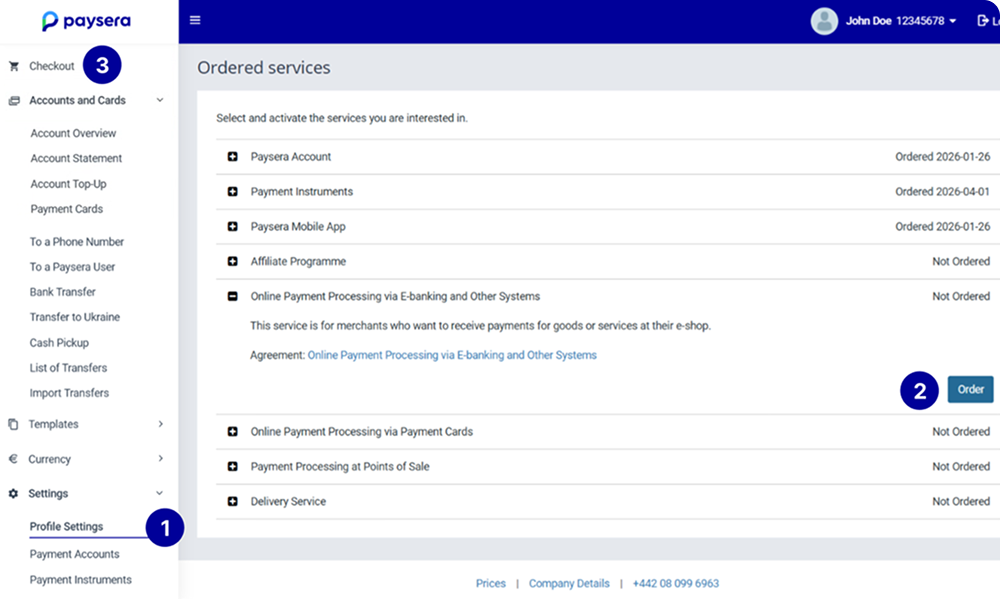
Order Service & Create Project
Log in to your Paysera client account, enable Online Payment Collection in your Profile Settings, then click Checkout in the top-left menu to create a new project.

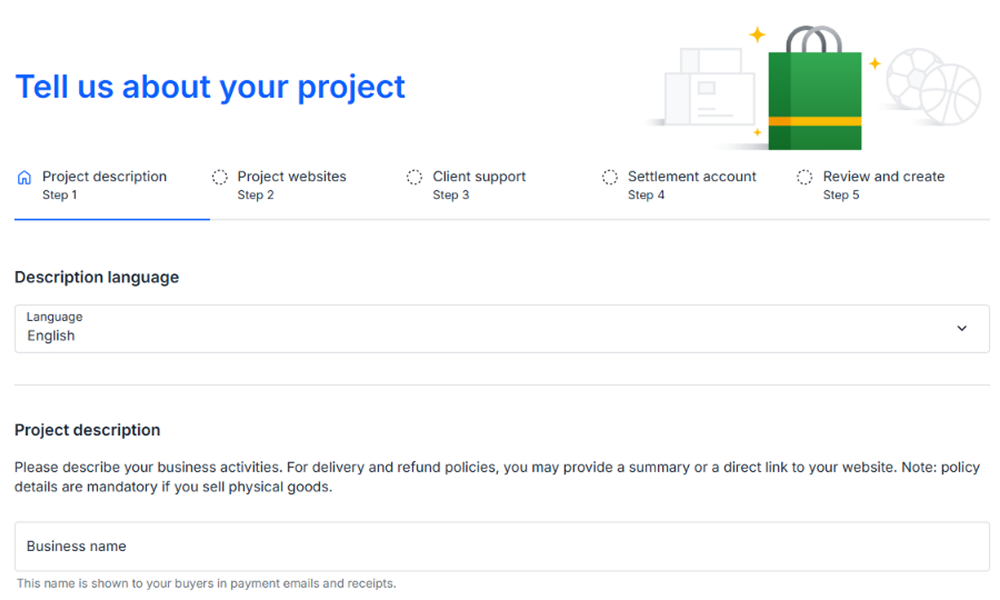
Configure Your Project
Describe your business, select your settlement account, and customize all preferences in our self-service portal.

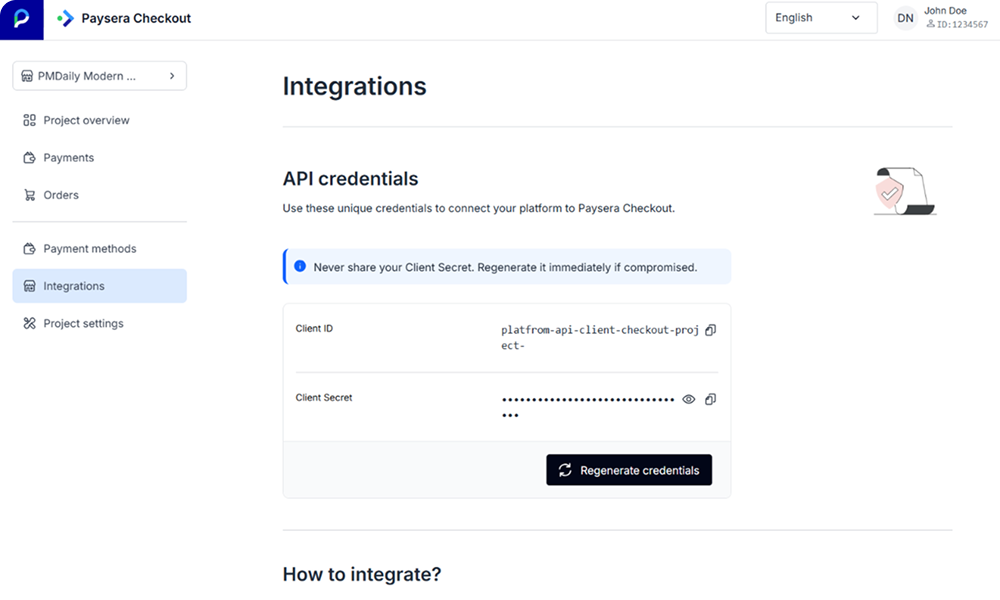
Integrate & Go Live
Install a plugin in 15 minutes or connect via REST API, then submit your project for review. Once approved, you’re ready to process zero-fee bank payments!
FAQ
To use Checkout Modern, you will need to create a new project. Your existing Checkout Classic project will not be transferred automatically.
If you do not see the Checkout section in your account, check that you have ordered the required service. You can request card payments later, inside your Checkout Modern project.
Client Support can create a new project based on your Checkout Classic settings. Email us at [email protected]. You can then skip steps 1 and 2.
- In your Paysera account, open the Checkout section and create a new project.
- Verify your website.
- Copy your Client ID and Client Secret from the project's Integrations tab.
- Install the Checkout Modern plugin and enter your Client ID and Client Secret.
- In the project actions menu (⋮), choose Enable Test Mode.
- Make a test payment.
- Click Submit for review.
If you built your own integration, rebuild it following the Checkout Modern specification instead of step 4.
We will review the project and either activate it or send it back with comments. Once we activate the project, switch your payments to it.
Important:
- Until you have switched, do not close your Checkout Classic project or change its website verification.
- Refunds for earlier payments can only be made from your Checkout Classic project.
Need help?
Email [email protected], or [email protected].